
Python Decision Making

Python Decision Making

Decisions in a program is used when program has conditional choices to execute code block. Let’s take an example of traffic lights, where different colors of lights lit up at different situations based on the conditions of the road or any specific rule.
It is the prediction of conditions that occurs while executing a program to specify actions. Multiple expressions get evaluated with an outcome of either TRUE or FALSE. These are logical decisions and Python also provides decision-making statements that to make decisions within a program for an application based on the user requirement.
Python provides various types of conditional statements:
Python Conditional Statements
StatementDescription
if StatementsIt consists of an Boolean expression which results is either TRUE or FALSE followed by one or more statements.
if else StatementsIt also contains a Boolean expression. The if statement is followed by an optional else statement & if the expression results in FALSE, then else statement gets executed. It is also called alternative execution in which there are two possibilities of the condition determined in which any one of them will get executed.
Nested StatementsWe can implement if statement and or if-else statement inside another if or if – else statement. Here more than one if conditions are applied & there can be more than one if within elif.

if Statement

The decision-making structures can be recognized and understood using flowcharts.
Figure – If condition Flowchart:
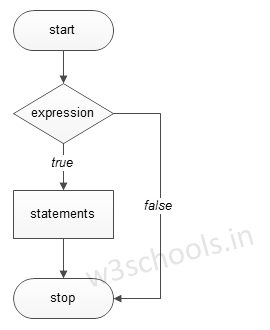
If condition Flowchart
Syntax:
if expression:
//execute your code
Example:
a = 15

if a > 10:
print("a is greater")
Output:
a is greater

if else Statements

Figure – If else condition Flowchart:
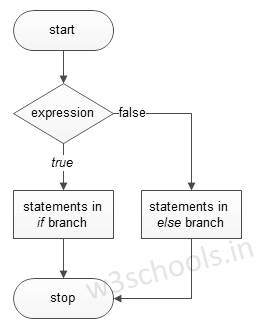
If-else condition Flowchart
Syntax:
if expression:
//execute your code
else:
//execute your code
Example:
a = 15
b
= 20

if a > b:
print("a is greater")
else:
print("b is greater")
Output:
b is greater

elif Statements

elif – is a keyword used in Python in replacement of else if to place another condition in the program. This is called chained conditional.
Figure – elif condition Flowchart:
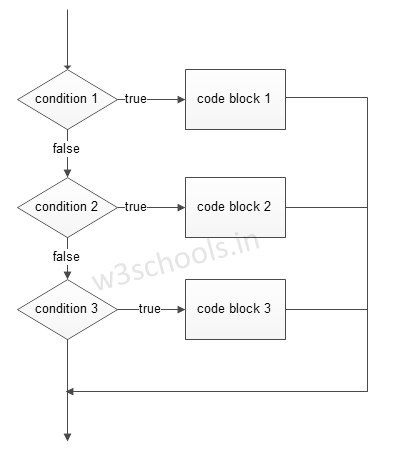
elif condition
Syntax:
if expression:
//execute your code
elif expression:
//execute your code
else:
//execute your code
Example:
a = 15
b
= 15

if a > b:
print("a is greater")
elif a == b:
print("both are equal")
else:
print("b is greater")
Output:
both are equal
We can write if statement in both way, within parenthesis or without parenthesis/ brackets i.e. ( and ).

Single Statement Condition

If the block of executable statement of if – clause contains only a single line, programmers can write it on the same line as a header statement.
Example:
a = 15

if (a == 15): print("The value of a is 15")

Comments

For Programs Click Here

Popular posts from this blog

Python Lists

Python Lists Dealing with data in a structured format is quiet generous, and this is possible if those data are set accordingly in a specific manner. So, Python provides these data structures named ‘lists’ and ‘tuples’ that are used to organize data in  single set. Python has 6 built-in sequences and among them the most famous are “lists and tuples”. The lists are containers that hold a number of other objects in a given order. It usually puts into practice the sequence protocol and allows programmers to add or remove objects from that sequence. Each element of the sequence is assigned a number i.e. he index and the first index is 0 (zero). This versatile data-type of Python is written in a sequence of list separated by commas between expressions. Creating Lists To build a list, just put a number of expressions in square brackets. The syntax is: Syntax: lst1 = [ ] # lst1 is the name of the list lst2 = [ expression1 , …. , expression_N ] Example: #!/usr/bin/python ls...

C++ Qualifiers and Storage Classes

C++ Qualifiers and Storage Classes Qualifiers and storage class are smaller but important programming concept that helps to make the quality of a variable more accurate for using that variable within the program. In this chapter you will learn about how qualifiers are used with variables and what the roles of different storage classes in C++ are. What is a Qualifier? A qualifier is a token added to a variable which adds an extra  quality , such as specifying volatility or constant-ness to a variable. They act like an adjective for a variable. With or without a qualifier, the variable itself still occupies the same amount of memory, and each bit has the same interpretation or contribution to the state/value. Qualifiers just specify something about how it may be accessed or where it is stored. Three qualifiers are there in C++. These are: const : This is used to define that the type is constant. volatile : his is used to define that the type is volatile. mutable:  applies to non...

Syllabus

Syllabus  C Programming Tutorials C Tutorial C Introduction History of C Programming Language C Installation C Program Structure C Input and Output (I/O) C Format Specifiers Declaration & Assignments C Tokens C Identifiers C Keywords C Constants C Operators C Data Types C Variables C Preprocessors C Type Casting C Custom Header File Flow Control C Decision Making C if Statements C if-else Statements C Nested if-else Statements C else-if Statements C goto Statement C switch Statements C Loops C while loops C do while loops C for loops Functions C Functions C Function Arguments C Library Functions C Variable Scope Arrays & Strings C Arrays C Strings Pointers C Pointers C Dynamic Memory Allocation Structure & Union C Structures C Unions File I/O C File Handling C fopen C fclose C getc C putc C getw C putw C fprintf C fscanf C fgets C fputs C feof                                     ...